Introduction
What is Devlog?
Devlog is a lightweight logging library that automatically detects and displays the file and line number where each log statement is called. This makes debugging faster by eliminating the need to manually add context to your log messages.
Why Devlog?
Traditional console logging requires you to manually add context about where the log is coming from. With devlog, this context is automatically captured and displayed, saving you time and making your logs more informative.
typescript
// Traditional approachconsole.log("[UserService.ts:42] User created:", user);
// With devloglog.info("User created", user);// Output: [UserService.ts:42] User created { id: 1, name: "Alice" }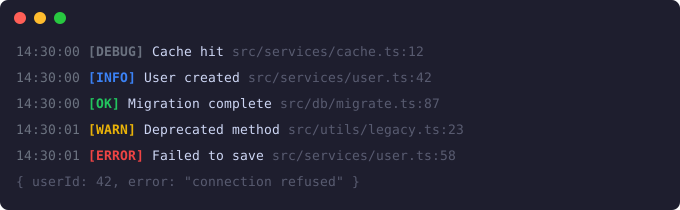
Devlog output example — colored log levels with automatic file and line context
Key Features
- Automatic detection of calling file and line number
- Zero dependencies - lightweight and fast
- Works in both Node.js and browser environments
- Five log levels: info, warn, error, success, debug
- Colored output for better readability
- Environment-based configuration for production
Comparison with console.log
| Feature | console.log | devlog |
|---|---|---|
| File/line context | Manual | Automatic |
| Colored output | Limited | Full support |
| Log levels | Basic | 5 levels |
| Environment control | Manual | Built-in |
| Data formatting | Basic | Enhanced |