Introduction
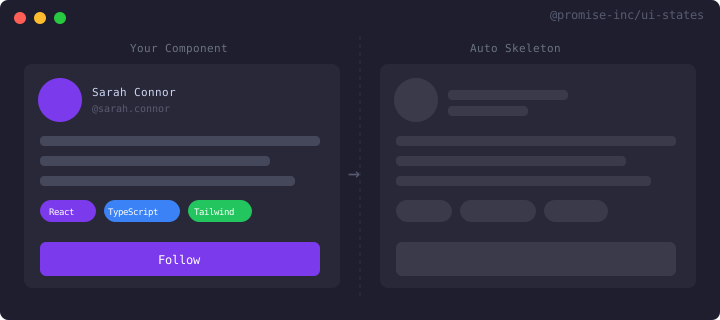
UI States demo — automatic skeleton loading from real DOM
What is UI States?
UI States is a React component that automatically generates skeleton loading states by measuring your actual rendered content. Instead of manually creating skeleton components that mirror your UI, UI States captures the structure of your real DOM and generates matching loading states automatically.
The Problem
Creating skeleton loading states is tedious and error-prone. You have to manually create skeleton components that match your real UI, and keep them in sync as your design evolves. This doubles your maintenance burden and leads to mismatched skeletons that don't match the actual content.
The Solution
UI States solves this by wrapping your content and automatically generating skeletons from the real DOM. When your content loads for the first time, UI States measures it and saves the structure. On subsequent loads, it shows a skeleton that perfectly matches your actual content.
How It Works
- Wrap your content with the UIStates component
- On first load, your real content renders and UI States measures it
- The structure is saved (optionally to sessionStorage)
- On subsequent loads, UI States shows a matching skeleton during loading
Key Benefits
- No manual skeleton creation - generated from real DOM
- Always in sync - skeletons match your actual UI
- Works with any data fetching solution
- Built-in TanStack Query integration
- Optional caching for instant skeleton display
- Accessible by default with ARIA attributes
Visual Example
// Before: Manual skeleton creation{isLoading ? (  <div className="space-y-4">    <div className="h-8 w-64 bg-gray-200 rounded" />    <div className="h-4 w-full bg-gray-200 rounded" />    <div className="h-4 w-3/4 bg-gray-200 rounded" />  </div>) : (  <div>    <h1>{data.title}</h1>    <p>{data.description}</p>    <p>{data.content}</p>  </div>)}
// After: UI States auto-generation<UIStates data={data} loading={isLoading}>  <h1>{data.title}</h1>  <p>{data.description}</p>  <p>{data.content}</p></UIStates>